tablewalk, the database browser
Open a PostgreSQL, MySQL or SQLite database in the browser, follow its foreign keys both ways, and keep it read-only.
npx tablewalk postgres://reader@localhost/crm # PostgreSQLnpx tablewalk mysql://reader@localhost/crm # MySQL or MariaDBnpx tablewalk ./crm.sqlite # a SQLite filenpx tablewalk --demo # no database yet: a throwaway sample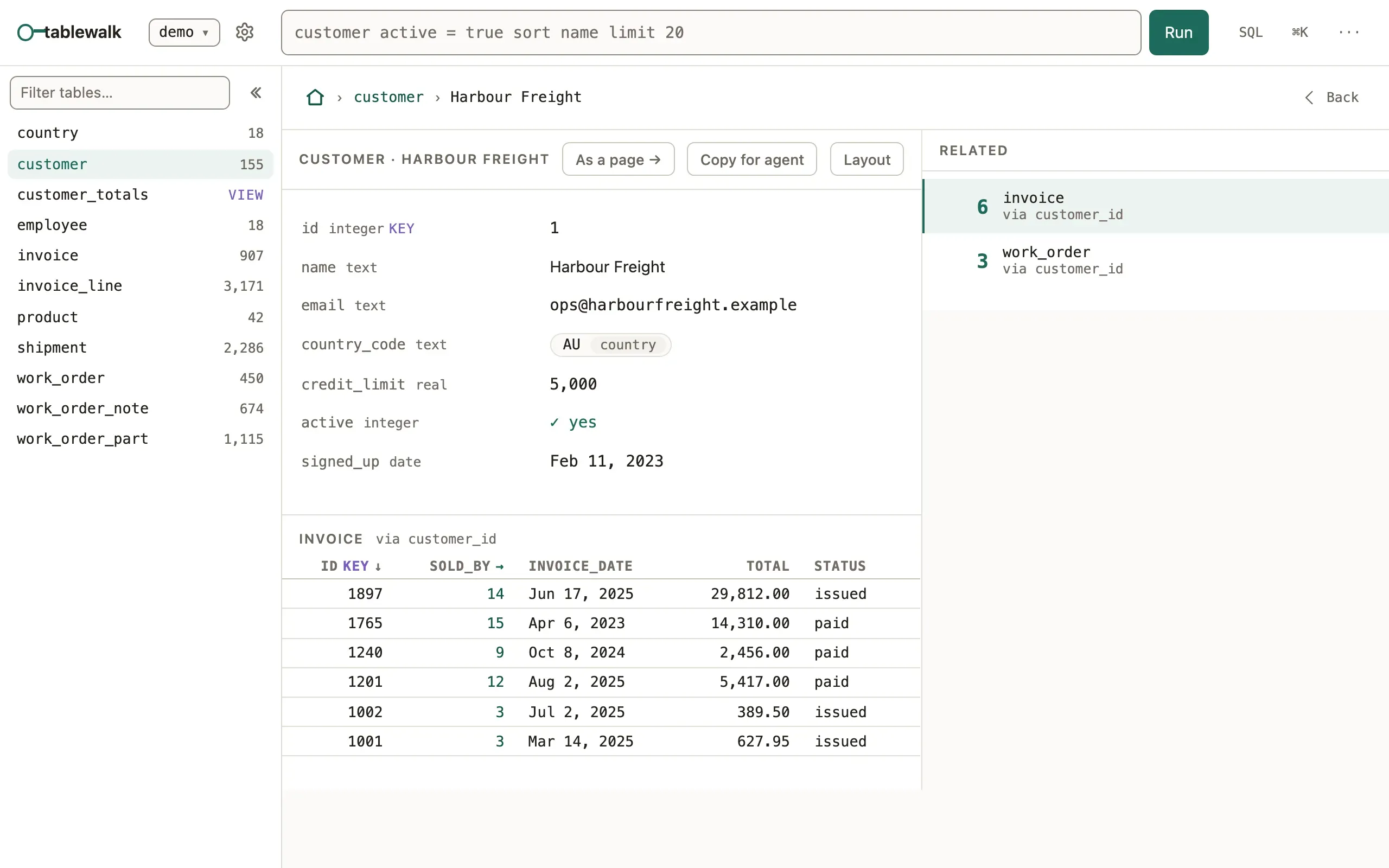
tablewalk is a product of its own, from the same repository as mistri: a
foreign key is a place you can go. It needs Node 24 or newer, no build step
and no config; npx tablewalk --version says which one you have. It serves no
App: npx tablewalk --app … is refused and names the npx mistri command
that runs it, and mistri, in turn, serves no database browser. Apps run on
PostgreSQL and SQLite; MySQL and MariaDB are for browsing.
What you’ll see
Section titled “What you’ll see”Listening on http://localhost:4111, then the database’s tables.--portpicks another port,--openopens the browser for you.- A record shows its fields, then every table that points at it, each with a
count. A reference such as an invoice’s
customer_idis a link to that customer; a table in the rail opens the rows that point here. - The address changes at each step (
/crm/customer/~42), so Back, a bookmark and a pasted link return to the same place.
Ask, don’t click
Section titled “Ask, don’t click”Type a question into the bar above a table, in the query language Apps use too:
invoice total > 500 sort total descThe condition is written into the address. Every one of these is a link you can type, paste or send:
| Address | Opens |
|---|---|
/demo/customer |
A table. Any query works here, URL-encoded: /demo/invoice%20total%20%3E%20500 |
/demo/customer/~42 |
The customer whose key is 42 |
/demo/customer/~42/~invoice:9 |
Invoice 9, reached from customer 42 |
/demo/customer!diagram |
A table’s tab: !rows, !ddl or !diagram |
/demo/@customer~42 |
A composed page, rooted at a record |
A json or jsonb column (SQLite JSON too) is laid out by its shape:
objects as fields, arrays of records as tables. Documents are read-only here.
Read-only, and meant
Section titled “Read-only, and meant”Every read runs in a read-only transaction. Writing is an opt-in for each
connection ("writable": true in a config file), checked by the server in
every route and tool that writes, not by the UI. The database role is the
limit that always holds, so connect as one that can only read:
CREATE ROLE tablewalk_reader LOGIN PASSWORD '…';GRANT USAGE ON SCHEMA public TO tablewalk_reader;GRANT SELECT ON ALL TABLES IN SCHEMA public TO tablewalk_reader;ALTER DEFAULT PRIVILEGES IN SCHEMA public GRANT SELECT ON TABLES TO tablewalk_reader;tablewalk warns at startup when the role it connects as could do more than read. To keep several databases, or a password out of your shell history, name them in a config file:
{ "connections": [ { "name": "crm", "url": "${DATABASE_URL}" }, { "name": "local", "url": "sqlite:./crm.sqlite" } ]}DATABASE_URL=postgres://reader@localhost/crm npx tablewalk --config ./tablewalk.json${VAR} reads the environment, and an unset variable is an error.
For a coding agent
Section titled “For a coding agent”npx tablewalk --mcp gives an agent the same database as
up to twenty-three tools: seventeen that only read, and six writes listed only
for a writable connection. Every answer carries a link to the same rows in the browser.
MCP for coding agents
Common mistakes
Section titled “Common mistakes”Cannot find module 'pg'(or'mysql2') → install the driver beside tablewalk:npm install pg.- A reference shows as a plain value and leads nowhere → the database has no foreign key for it, and the walk follows only declared ones; add the constraint.
- The address answers nothing → another process holds port 4111; pass
--port 4112. - An old
#/…link lands on the home page → the hash is not read; drop the#and the rest is the path.
Related
Section titled “Related”- Query language: the bar’s whole grammar, grouping and counting.
- MCP for coding agents: the tools, and how to wire them into an agent.
- Keyboard: step through records with
jandk. - Command line: database browser: every flag.
- Quickstart: an App from your database: turn the same database into a workspace for a team, with mistri.